


OPENTRAIN AI DOCUMENTATION
Complete your agency profile
What each of the seven agency setup steps asks for, which fields are required, and how to edit your agency profile later.
Your agency profile is what employers review when they compare data labeling partners and read your proposals. Agency setup collects it in seven steps. Fields marked with a red asterisk (*) are required: Continue stays off until you fill them in.
Each step saves when you select Continue, so you can stop and come back. Setup reopens at the first step you have not finished. Use a computer: agency setup does not open on a phone.
The seven steps
Section titled “The seven steps”Company Details
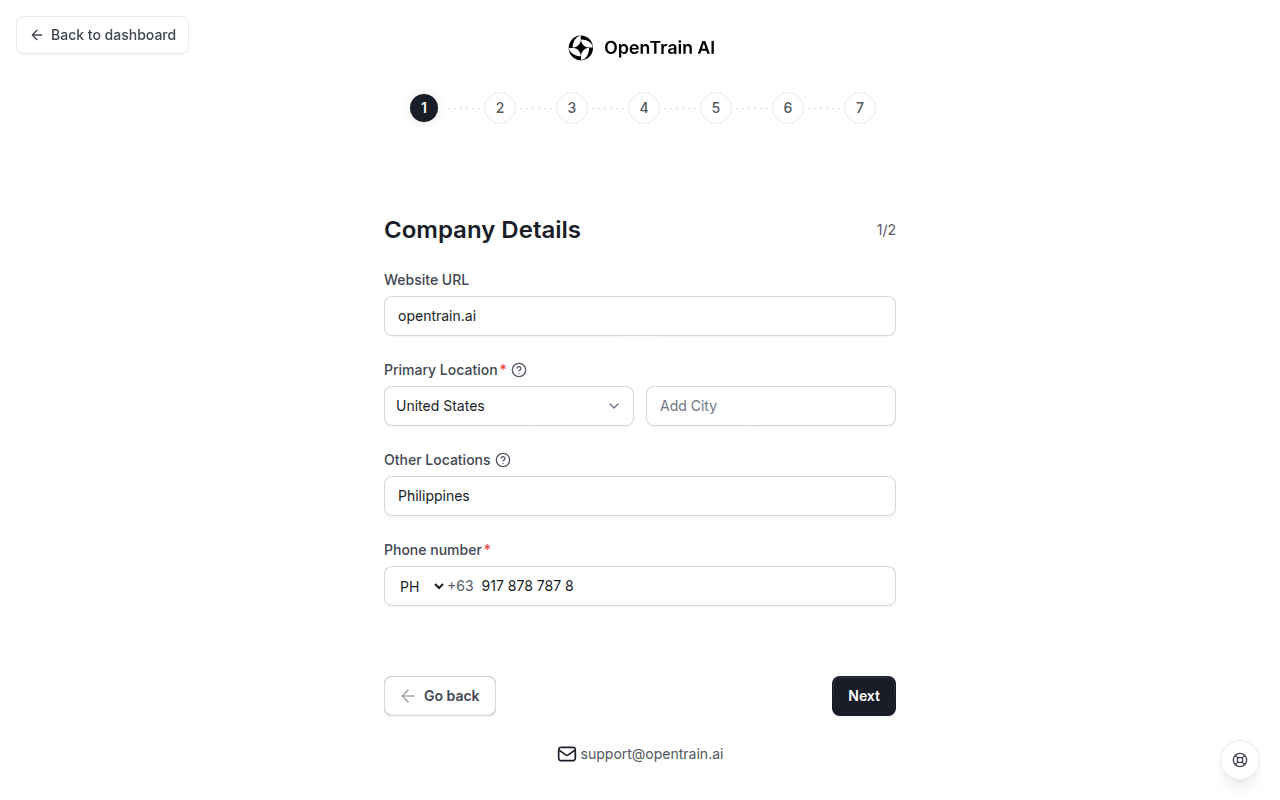
This step has two parts.
Part 1 of 2:
- Website URL.
- Primary Location (required): the country and city of your main data labeling or annotation office.
- Other Locations: any other offices your team works from.
- Phone number (required). In some countries you also verify the number: select Verify phone number and enter the code you receive.
Part 2 of 2:
- Company Logo.
- Company Overview (required): a short description of what your team does.
- LinkedIn Profile URL. Adding your company’s LinkedIn page helps employers learn about your experience.
Company Skillset
This step has two parts.
Part 1 of 2: choose your company’s Data Labeling/AI Training Experience Level (required):
- Entry Level: less than 2 years of company experience in AI data labeling or annotation.
- Intermediate: 2 to 5 years.
- Expert: more than 5 years.
Part 2 of 2:
- Industry Specializations (required).
- AI Data Labeling Software: the labeling tools your team uses.
- Data Type Expertise (required): the kinds of data your team works with.
- Task Type Expertise (required): the kinds of tasks your team does best.
Languages
Choose your team’s English Level (required): Native or Bilingual, Fluent, Conversational, Basic, or None. Under Other Languages, add each other language your team works in, with a proficiency level. If you choose None for English, add at least one other language.
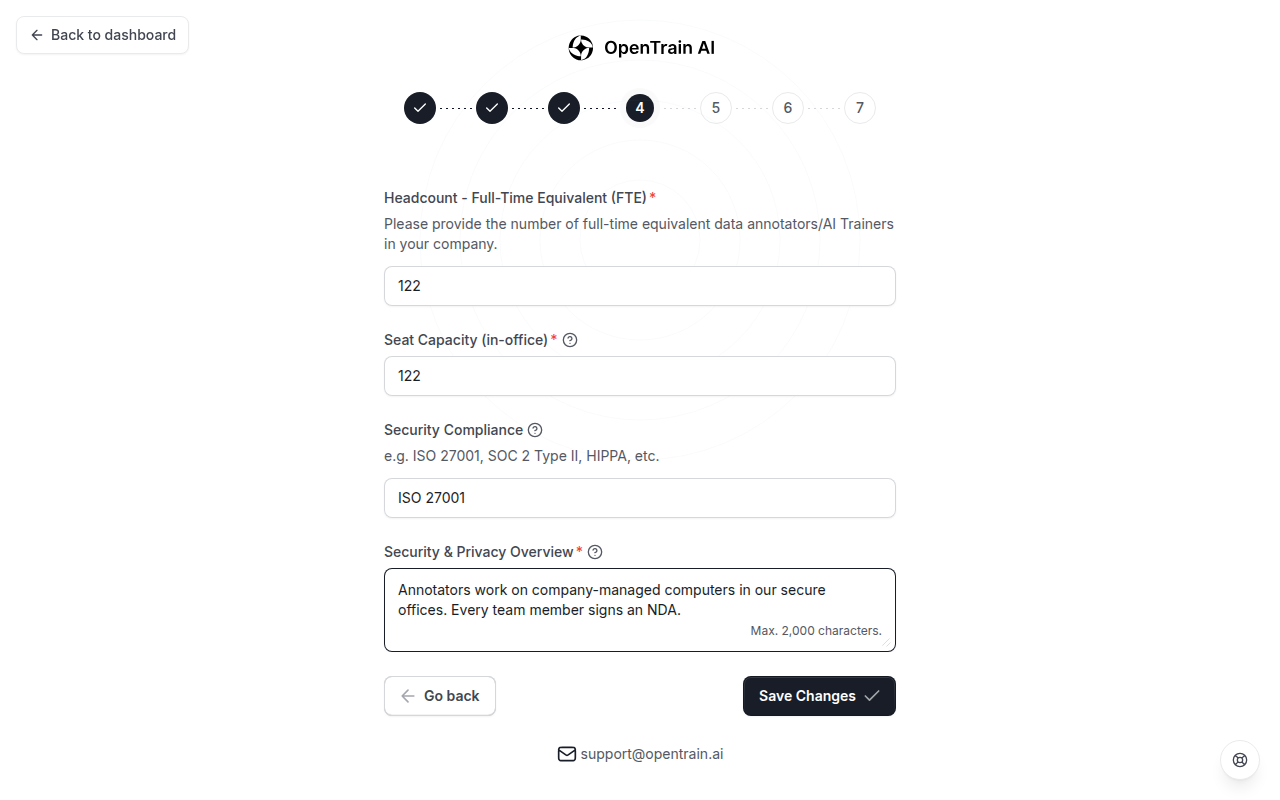
Headcount & Security
- Headcount - Full-Time Equivalent (FTE) (required): the number of full-time equivalent data annotators or AI trainers in your company.
- Seat Capacity (in-office) (required): the number of seats or workstations in your offices that are ready to use for a project.
- Security Compliance: type the security certifications your company holds, such as SOC 2, ISO 27001, HIPAA, GDPR, PCI DSS, FedRAMP, or FISMA, separated by commas. List only the ones your company actually holds.
- Security & Privacy Overview (required): a short description of how your company protects client data, up to 2,000 characters.
Pricing
- Hourly Rate (required): your standard rate in US dollars per hour.
- Pay per Label Projects: turn this on if you are open to billing per label, where the client pays for each label your team applies.
- Fixed Price Projects: turn this on if you will work for a fixed price on a specific dataset.
Data Labeling/AI Training Experience
Add the past projects that show what your team has done. Select Click to add Data Labeling/AI Training Experience, or Add more experience once you have one. For each project, enter the Title, Data type, Labeling Type, Labeling Software Used, Subject matter/industry, Start date, an End date or Ongoing Project, a Project Description, and the Project Team Size. Additional Information is optional.
Your projects appear on your OpenTrain AI profile. This step is not required, but employers look for concrete examples of similar work.
Review details
Check every section. Select Edit next to a section to change it; you come back to this page when you save. When everything is right, select Finish Onboarding. OpenTrain AI confirms with Application submitted successfully! and opens your home page.
Edit your profile later
Section titled “Edit your profile later”Open your agency profile and select Edit Profile. Setup opens on Review details. Select Edit next to a section, make your changes, and select Save Changes.
Tips for a profile employers can use
Section titled “Tips for a profile employers can use”- Be specific. “We annotate medical images in CVAT with a team of 40” tells an employer more than “we do all data types.”
- Only claim what is true. List only the certifications, capacity, and tools your company has today.
- Keep it current. Update your team size, tools, languages, and projects as your company changes.
Next step
Section titled “Next step”Browse projects open to agencies and send your first proposal.