
.svg)
.svg)
OPENTRAIN AI DOCUMENTATION
Use your Work Email
How AI trainers access, read, organize, and send email from an OpenTrain-managed @opentrain.work address.
Work Email gives you an OpenTrain-managed @opentrain.work address for project invitations, client tools, and work-related email. It is separate from the personal email address you use to sign in to OpenTrain.
Most AI trainers use Work Email to receive project invitations, workspace access links, and other email needed to begin work.
Open your Inbox
Section titled “Open your Inbox”Sign in to your AI Trainer account
Sign in with your normal OpenTrain account. You do not need a separate password for your @opentrain.work address.
Open Work Email
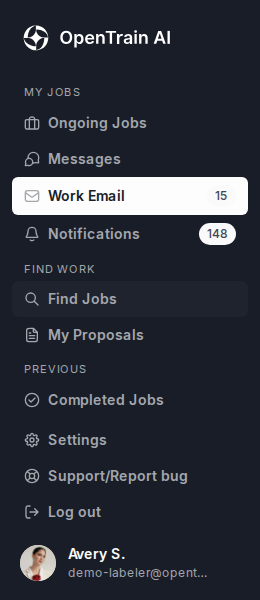
Select the envelope icon for Work Email in the AI Trainer side navigation. You can also open Work Email directly.
Open Inbox
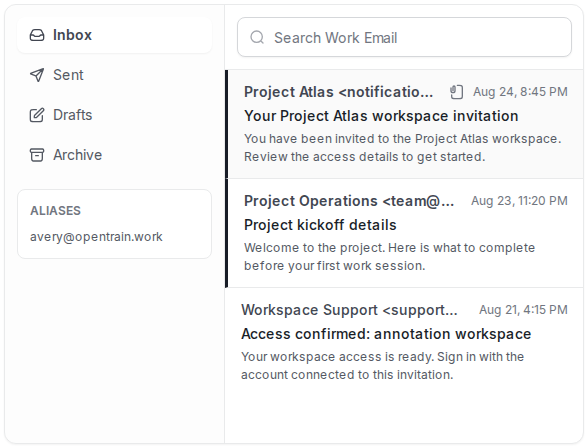
Work Email opens to Inbox. Incoming messages appear in the center list. Unread messages use bold text and a dark line on the left.
Select an email
Select the sender or subject of the email you want to read. The email opens beside the Inbox on a computer, or on a separate screen on a phone.
Read an email
Section titled “Read an email”When you open an email, check the From address, subject, and message before following an invitation link or downloading a file. Your @opentrain.work address appears on the To line.
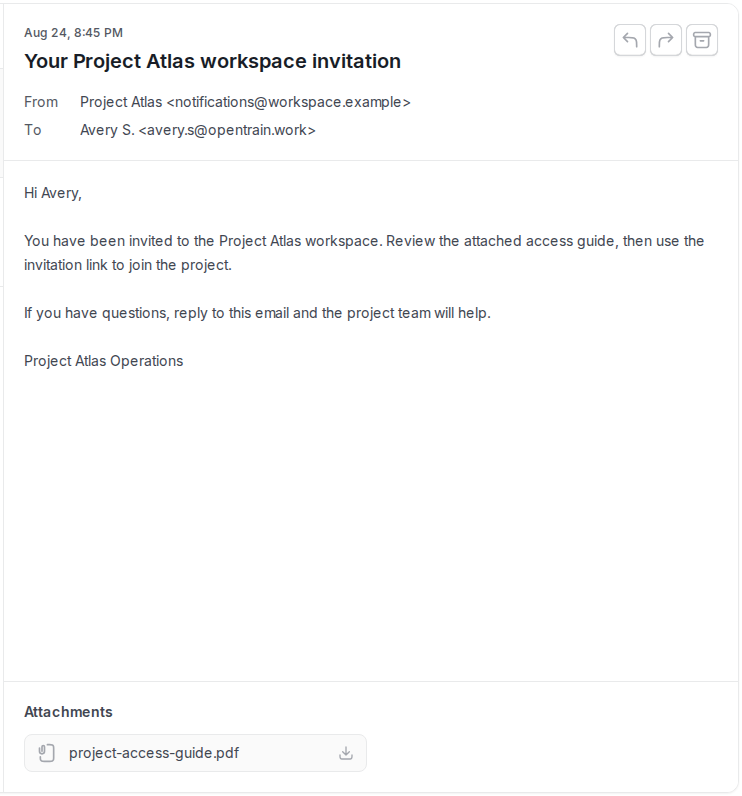
From an open email, you can:
- Reply to the sender.
- Forward the email to another recipient.
- Archive the email to remove it from the Inbox without deleting it.
- Download an attachment by selecting its file name.
Find and organize email
Section titled “Find and organize email”Use the folders on the left side of Work Email:
- Inbox contains email you have received.
- Sent contains email you have sent.
- Drafts contains messages you saved without sending.
- Archive contains messages you removed from the Inbox without deleting.
Use Search Work Email to find messages by a word or phrase. Select Refresh if you are waiting for a new project invitation or access email.
Your primary @opentrain.work address appears at the top of Work Email. Any additional address assigned to you appears under Aliases.
Send a Work Email
Section titled “Send a Work Email”Start a message
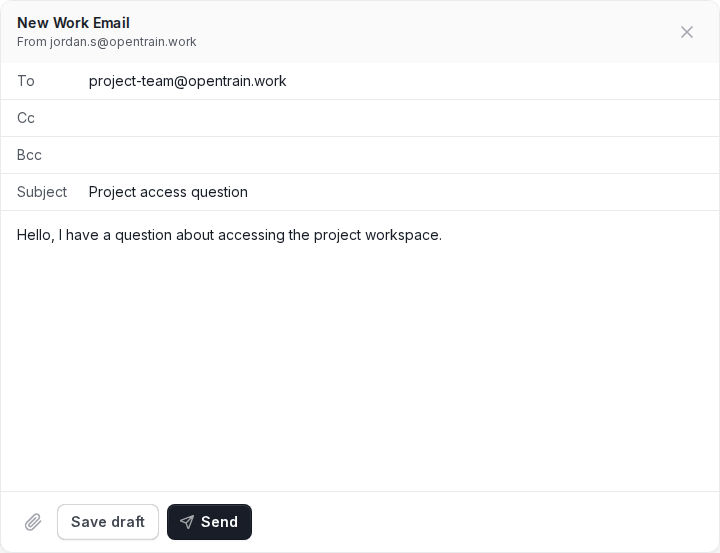
Select Compose. The composer shows the @opentrain.work address that will send the email.
Address and write the email
Enter the recipient in To. Add Cc or Bcc recipients when needed, then add a subject and write your message.
Add an attachment if needed
Select the attachment icon and choose the file you want to attach.
Send or save it
Select Send when the message is ready. Select Save draft if you want to finish it later from the Drafts folder.
Work Email and OpenTrain Messages are different
Section titled “Work Email and OpenTrain Messages are different”| Use | Best place |
|---|---|
| Talk with an employer about a proposal or active OpenTrain job | OpenTrain Messages |
| Receive a client-tool or project-workspace invitation | Work Email |
| Send or receive regular email for project access | Work Email |
| Keep an in-platform job conversation with its proposal or contract | OpenTrain Messages |
If an employer tells you that an invitation was sent to your Work Email, open the Inbox and select Refresh. Search for the tool or project name, then check Archive. If it still does not appear, ask the employer or project manager to resend it.
Troubleshooting
Section titled “Troubleshooting”I do not see Work Email in the navigation
Work Email appears after a mailbox is assigned to your account. Email support@opentrain.ai from the email address connected to your OpenTrain account and ask whether Work Email is available for you.
My address appears, but the mailbox does not load
Select Refresh, then reload the page. If the problem continues, email support@opentrain.ai and include a screenshot of the message you see. Do not include passwords or access codes.
A project invitation has not arrived
Search for the project or tool name, check Archive, and select Refresh. Confirm that the sender used the @opentrain.work address shown at the top of your mailbox. Ask the employer or project manager to resend the invitation if necessary.
I cannot send a message
Confirm that the recipient address and subject are complete, then try again. If the message is still blocked, save it as a draft and email support@opentrain.ai with the error text. Do not share passwords or one-time access codes.