


OPENTRAIN AI
付款概览
OpenTrain AI 上的付款运作方式:基于里程碑的模式、雇主付款方式以及 AI trainer 提现设置。
OpenTrain AI 采用基于里程碑的付款模型。雇主预先为工作注资,AI trainers 完成交付成果,一旦雇主批准,OpenTrain 便会通过 Stripe 向 AI trainer 支付款项。
付款运作方式
Section titled “付款运作方式”雇主创建里程碑并充资
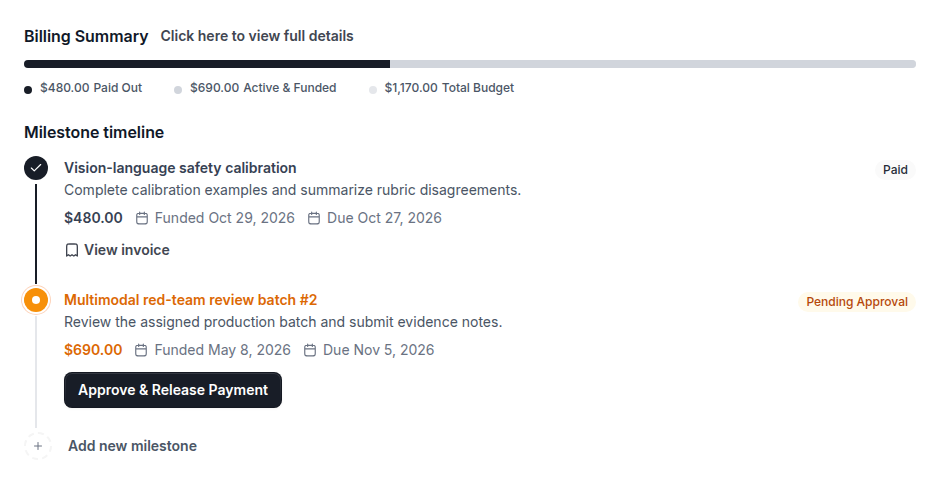
当您(雇主)聘请 AI trainer 时,您会创建代表工作单元并约定付款金额的里程碑。点击 Fund milestone(为里程碑充资)会从您的付款方式扣款,并为该里程碑托管资金。
AI Trainer 完成工作
AI trainer 在职位的 Contract(合同)选项卡上查看已充资的里程碑并完成约定的工作。准备就绪后,他们点击 Complete & Request Payout(完成并申请款项发放)。
雇主批准
您审核已完成的工作,然后点击 Approve & Release Payment(批准并放款)。批准后将开始向 AI trainer 关联的银行账户发放款项。
AI Trainer 收到款项
Stripe 按款项发放计划将资金发送至 AI trainer 关联的银行账户。如果 AI trainer 尚未完成款项发放设置,款项将等待其完成设置后再发放。
双方各自需要设置的内容
Section titled “双方各自需要设置的内容”雇主
作为雇主,您需要存档有效的付款方式才能为里程碑充资。当您在职位的 Contract(合同)选项卡上点击 Fund milestone(为里程碑充资)时,系统会向该方式扣款。您无需拥有自己的 Stripe 账户:OpenTrain AI 代表您通过 Stripe 收取款项。
AI Trainers
作为 AI trainer,您必须在 OpenTrain 账户设置中添加用于款项发放的银行账户,然后才能接收款项。请从 Settings -> Payouts -> Add bank account(设置 -> 款项发放 -> 添加银行账户)开始。Stripe 托管该安全表单,但您不应在 stripe.com 上创建单独的 Stripe 账户。有关设置说明,请参阅付款与款项发放。