

What AI Training Work Actually Looks Like for Freelancers


AI training work is usually paid judgment under project rules. Here is what the main task types look like, what screening may ask for, and how to read pay before you apply.
AI training work is real freelance work, but it usually does not look like building a model.
More often, it looks like ranking two answers, labeling an image, checking whether a response followed instructions, rewriting a weak answer, reviewing a proof, testing a safety boundary, or using domain knowledge to catch a model’s mistake.
That is why AI training listings can feel confusing. One role sounds like data annotation. Another sounds like editing. Another asks for a medical license, coding experience, native-language fluency, or comfort with sensitive safety work.
The useful question is not whether the category exists. It does. The useful question is which task type fits your skills, what the platform may ask before paid work starts, and whether the listing gives enough detail to be worth your time.
The short version
That judgment can be simple or specialized. A task might ask you to label a document field, compare two model responses, write a better answer, review code, verify a math solution, check a clinical explanation, rate audio pronunciation, or document a model failure.
Three rules make the category easier to read:
- Task type matters more than the phrase “AI trainer.”
- Qualification does not guarantee steady task volume.
- A rate claim is only useful when you know the pay basis, eligibility, screening cost, and acceptance rule.
What AI training work is in practice
AI training work means humans provide signals that models cannot reliably create or verify on their own.
Sometimes the signal is a label: this image contains a damaged package, this document field is the invoice date, this audio clip matches the sentence.
Sometimes it is a judgment: answer A is more accurate than answer B, this response ignores the user’s constraint, this code passes the visible tests but fails an edge case.
Sometimes it is a better example: a cleaner prompt, an ideal answer, a rewritten response, or a specialist correction the model can learn from.
This is not the same as a full-time AI research role, and it is not a generic survey site. Many platforms describe the work as freelance, project-based, or independent-contractor work, with task availability tied to client demand and project fit.
The main task types
Use the task label in a listing as a clue, not a guarantee. Different platforms use different words for similar work.
Annotation and data labeling
You may see an image, form, document, audio clip, map query, search result, or video segment with instructions. You submit tags, boxes, field labels, ratings, transcript checks, quality marks, or yes/no decisions. This fits people who are patient, consistent, and good at following detailed rules. The hard part is often ambiguity and fatigue: hundreds of similar items still need the same level of care.
Response evaluation
You may see one model answer and a set of criteria: accuracy, relevance, safety, style, or instruction-following. You submit a score, label, short rationale, or correction. This fits strong readers, editors, tutors, and domain reviewers. The beginner mistake is grading by personal preference instead of the task criteria.
Preference ranking
You may see two model answers to the same prompt. You choose the better answer and explain why. In some projects, this is one plain-English shape of RLHF: human preference feedback that helps compare model outputs. The work can be harder than it looks because both answers may be partly good, so you need to notice factuality, completeness, constraint-following, tone, and safety at the same time.
Writing, rewriting, and ideal answers
You may get a topic, prompt, weak answer, desired style, or domain instruction. You submit a prompt-response pair, an improved answer, or a better example for the model to learn from. This fits writers and editors who can follow tight instructions. The risk is adding unsupported facts, drifting from the requested scope, or writing something polished that does not match the project rules.
Domain expert review
You may review a medical explanation, legal reasoning, financial answer, science summary, localization example, clinical image, report, or specialist prompt. You submit a correction, critique, ranking, validation, or better answer. These roles usually need stronger proof up front: credentials, licenses, degrees, CVs, professional experience, region-specific eligibility, or work samples. The challenge is translating real expertise into structured review tasks without overclaiming outside your scope.
Code and math evaluation
You may see a proof trace, code snippet, AI-generated solution, terminal output, log, or agent trajectory. You submit a grade, fix, better answer, test evidence, or ranking. This fits people who can verify work, not just produce it. The beginner trap is accepting plausible reasoning without checking whether it actually holds.
Safety and red-team review
You may be asked to stress-test a model, create harmful-prompt probes, review unsafe behavior, or document a failure. You submit a finding, category, rationale, or reproduction note. This work can involve sensitive material. It is a better fit for people who can follow narrow safety rules, document carefully, and manage exposure. If you only want cheerful, low-stakes tasks, this may be the wrong lane.
Multimodal review
You may review audio, images, video, documents, maps, app interactions, speech, or mixed media. You submit labels, ratings, transcript checks, local judgments, pronunciation ratings, or media-specific quality notes. The work may depend on native-language fluency, local knowledge, device access, or comfort switching between media. Do not assume media tasks are simple just because they are visual or audio-based.
The main AI training task types, and how to read each one before applying.
| Task type | What appears on screen | What you submit | Skill fit | Beginner difficulty |
|---|---|---|---|---|
| Annotation and data labeling | Image, form, document, audio clip, map query, search result, or video with instructions. | Tags, boxes, field labels, ratings, transcript checks, or yes/no decisions. | Patient, consistent, good at following detailed rules. | Lower entry, but ambiguity and fatigue are the real challenge. |
| Response evaluation | One model answer plus criteria such as accuracy, relevance, safety, or instruction-following. | A score, label, short rationale, or correction. | Strong readers, editors, tutors, and domain reviewers. | Medium; grading by preference instead of criteria is the common mistake. |
| Preference ranking | Two model answers to the same prompt. | The better answer and a short explanation of why. | People who can weigh accuracy, completeness, tone, and safety at once. | Medium; both answers can be partly good. |
| Writing, rewriting, ideal answers | A topic, prompt, weak answer, desired style, or domain instruction. | A prompt-response pair, improved answer, or better example. | Writers and editors who follow tight instructions. | Medium; adding unsupported facts or drifting from scope is the risk. |
| Domain expert review | A medical, legal, financial, scientific, clinical, or specialist explanation, report, or prompt. | A correction, critique, ranking, validation, or better answer. | Credentialed or experienced specialists. | Higher; usually needs proof of expertise up front. |
| Code and math evaluation | A proof trace, code snippet, AI-generated solution, terminal output, log, or agent trajectory. | A grade, fix, better answer, test evidence, or ranking. | People who can verify work, not just produce it. | Higher; accepting plausible-but-wrong reasoning is the trap. |
| Safety and red-team review | A model to stress-test, an unsafe behavior to review, or a failure to document. | A finding, category, rationale, or reproduction note. | People who can follow narrow safety rules and manage exposure. | Higher; can involve sensitive content. |
| Multimodal review | Audio, images, video, documents, maps, app interactions, speech, or mixed media. | Labels, ratings, transcript checks, local judgments, or pronunciation ratings. | Often needs native-language fluency, local knowledge, or device access. | Varies; visual or audio does not mean simple. |
Annotation and data labeling
- What appears on screen
- Image, form, document, audio clip, map query, search result, or video with instructions.
- What you submit
- Tags, boxes, field labels, ratings, transcript checks, or yes/no decisions.
- Skill fit
- Patient, consistent, good at following detailed rules.
- Beginner difficulty
- Lower entry, but ambiguity and fatigue are the real challenge.
Response evaluation
- What appears on screen
- One model answer plus criteria such as accuracy, relevance, safety, or instruction-following.
- What you submit
- A score, label, short rationale, or correction.
- Skill fit
- Strong readers, editors, tutors, and domain reviewers.
- Beginner difficulty
- Medium; grading by preference instead of criteria is the common mistake.
Preference ranking
- What appears on screen
- Two model answers to the same prompt.
- What you submit
- The better answer and a short explanation of why.
- Skill fit
- People who can weigh accuracy, completeness, tone, and safety at once.
- Beginner difficulty
- Medium; both answers can be partly good.
Writing, rewriting, ideal answers
- What appears on screen
- A topic, prompt, weak answer, desired style, or domain instruction.
- What you submit
- A prompt-response pair, improved answer, or better example.
- Skill fit
- Writers and editors who follow tight instructions.
- Beginner difficulty
- Medium; adding unsupported facts or drifting from scope is the risk.
Domain expert review
- What appears on screen
- A medical, legal, financial, scientific, clinical, or specialist explanation, report, or prompt.
- What you submit
- A correction, critique, ranking, validation, or better answer.
- Skill fit
- Credentialed or experienced specialists.
- Beginner difficulty
- Higher; usually needs proof of expertise up front.
Code and math evaluation
- What appears on screen
- A proof trace, code snippet, AI-generated solution, terminal output, log, or agent trajectory.
- What you submit
- A grade, fix, better answer, test evidence, or ranking.
- Skill fit
- People who can verify work, not just produce it.
- Beginner difficulty
- Higher; accepting plausible-but-wrong reasoning is the trap.
Safety and red-team review
- What appears on screen
- A model to stress-test, an unsafe behavior to review, or a failure to document.
- What you submit
- A finding, category, rationale, or reproduction note.
- Skill fit
- People who can follow narrow safety rules and manage exposure.
- Beginner difficulty
- Higher; can involve sensitive content.
Multimodal review
- What appears on screen
- Audio, images, video, documents, maps, app interactions, speech, or mixed media.
- What you submit
- Labels, ratings, transcript checks, local judgments, or pronunciation ratings.
- Skill fit
- Often needs native-language fluency, local knowledge, or device access.
- Beginner difficulty
- Varies; visual or audio does not mean simple.
Synthesized from common AI training and data-labeling task descriptions across platforms. Wording varies by listing.
What a task screen might ask you to do
Different projects show different screens, but two common shapes are useful to picture before you apply. Both examples below are illustrative only.
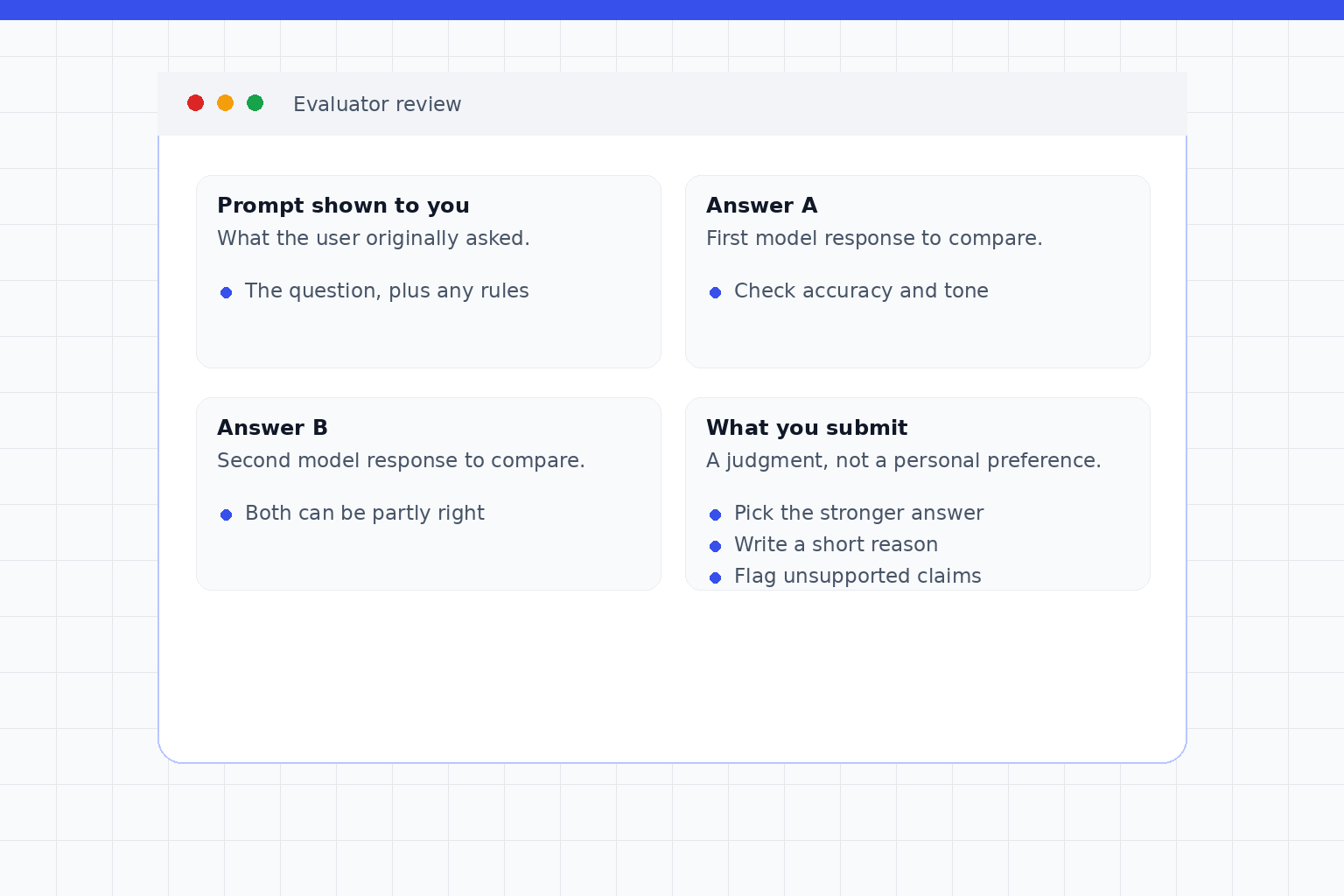
Audio and pronunciation tasks follow a similar shape: you might see an audio clip and a target phrase, then confirm whether the speaker said it, rate pronunciation quality, flag background noise or unusable audio, and apply language-specific instructions.
Applications, tests, calibration, and onboarding
A realistic path often moves through several gates before paid work appears. Platforms do not all use the same words: screening, certification, qualification, calibration, orientation, assessment, and project onboarding can all describe related steps.
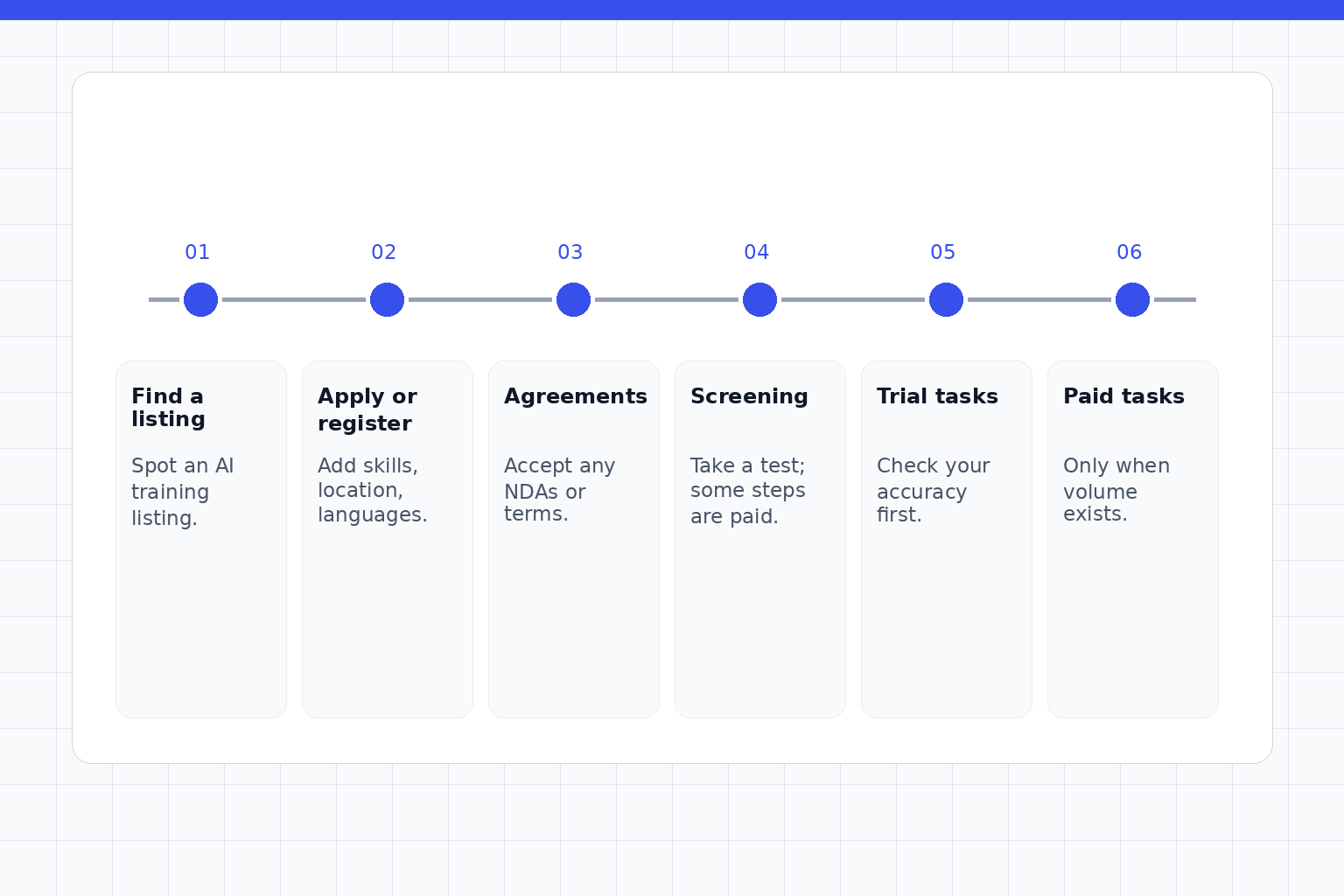
The words differ by platform, but the order is usually similar — and paid tasks only appear after you qualify and the project has volume for you.
What platforms may ask for
Expect some mix of profile details; skills and work history; language and location eligibility; availability; payment setup; phone or identity verification; a resume, CV, LinkedIn profile, portfolio, credential, publication, repository, or education evidence; an NDA or confidentiality agreement; device requirements; project-specific questionnaires; and platform rules, quality thresholds, or time and activity expectations.
These asks are platform-specific. Do not assume one ID process, payment method, privacy policy, tax flow, or eligibility rule applies everywhere. Also assume confidentiality matters: many AI training projects prohibit screenshots, local copies, account sharing, public portfolio screenshots, or discussion of project instructions outside approved channels.
This article is not tax, legal, immigration, or privacy advice. Read the platform’s current policies before you submit sensitive information or start work.
How pay is structured
Do not evaluate a listing by the biggest number on the page. The same-looking role can be paid in very different ways, and a rate is only useful when you know what the number means.
How AI training pay is structured. Pay basis matters more than the headline number.
| Pay basis | What it means | What to check |
|---|---|---|
| Hourly | Paid for time worked. | Whether training, testing, and onboarding time counts, and whether hours are capped. |
| Per task | Paid for each task you complete. | How long a task really takes, and whether rejected tasks are paid. |
| Per accepted task | Paid only for tasks that pass review. | Who decides acceptance, and whether there is a rework or dispute path. |
| Per asset or per word | Paid per approved asset or per word. | What counts as approved, and how revisions are handled. |
| Per milestone | Paid when a defined milestone is reached. | What defines the milestone and when it is confirmed. |
| Fixed reward | A set reward shown before a task. | Whether the reward is paid on completion or only on acceptance. |
| Bonus, surge, or incentive | Extra pay on top of a base rate. | Whether the base rate alone is still acceptable to you. |
| Paid vs unpaid steps | Some orientation or trials are paid; some application, screening, or onboarding time is not. | Whether the page explicitly says a test, trial, or onboarding step is paid. |
Hourly
- What it means
- Paid for time worked.
- What to check
- Whether training, testing, and onboarding time counts, and whether hours are capped.
Per task
- What it means
- Paid for each task you complete.
- What to check
- How long a task really takes, and whether rejected tasks are paid.
Per accepted task
- What it means
- Paid only for tasks that pass review.
- What to check
- Who decides acceptance, and whether there is a rework or dispute path.
Per asset or per word
- What it means
- Paid per approved asset or per word.
- What to check
- What counts as approved, and how revisions are handled.
Per milestone
- What it means
- Paid when a defined milestone is reached.
- What to check
- What defines the milestone and when it is confirmed.
Fixed reward
- What it means
- A set reward shown before a task.
- What to check
- Whether the reward is paid on completion or only on acceptance.
Bonus, surge, or incentive
- What it means
- Extra pay on top of a base rate.
- What to check
- Whether the base rate alone is still acceptable to you.
Paid vs unpaid steps
- What it means
- Some orientation or trials are paid; some application, screening, or onboarding time is not.
- What to check
- Whether the page explicitly says a test, trial, or onboarding step is paid.
Pay-basis structures only. Specific rates vary by platform, role, geography, and project, and are not shown here.
Before you trust any number, ask whether training and testing time counts, who decides acceptance, whether rejected tasks are paid, whether there is a rework or dispute path, whether hours are capped, whether the rate is tied to location, language, credentials, or assessment score, and whether the work is actually available after qualification.
Good listing signals and red flags
Before applying, read the listing like a worker, not a fan of the category.
This is practical scam-awareness, not legal advice. When in doubt, slow down and verify the platform through official channels.
How to start without overcommitting
Start narrow. Pick one or two task types that fit your strengths.
If you are detail-oriented and patient, test annotation, judging, transcription, or document review first. If you write clearly, test response evaluation, preference ranking, rewriting, or prompt-answer work. If you have a license, degree, specialized work history, or native-language and local expertise, look for domain and localization roles that actually ask for that proof. If you are technical, focus on code, math, test-running, log inspection, proof review, or agent-trajectory evaluation.
Where OpenTrain fits
OpenTrain fits into this process as a discovery and profile layer. Freelancers can use it to find AI training and data-labeling opportunities, build one profile, inbox, and portfolio or work-history surface, and compare work across 20+ platforms. That can reduce account sprawl and help you decide which task types are worth testing first.
It is not a guarantee of acceptance, steady tasks, task volume, or earnings. Treat it as a practical place to organize your search and present your work history.