> ## Documentation Index
> Fetch the complete documentation index at: https://opentrain.ai/docs/llms.txt
> Use this file to discover all available pages before exploring further.
# Organization balance access
> Approve or reject teammate requests to use the organization balance for scoped job and folder milestone actions.
Organization balance access protects delegated balance funding and release actions when teammates help manage jobs or folders. Owners can approve access requests so teammates can use the organization balance for scoped milestone actions without giving them broader organization control.
## When authorization is needed
A teammate may need organization balance access before they can hire with the organization balance, fund a milestone with the organization balance, or release a milestone funded from the organization balance. The request is tied to the job or folder scope.
## Where to find requests
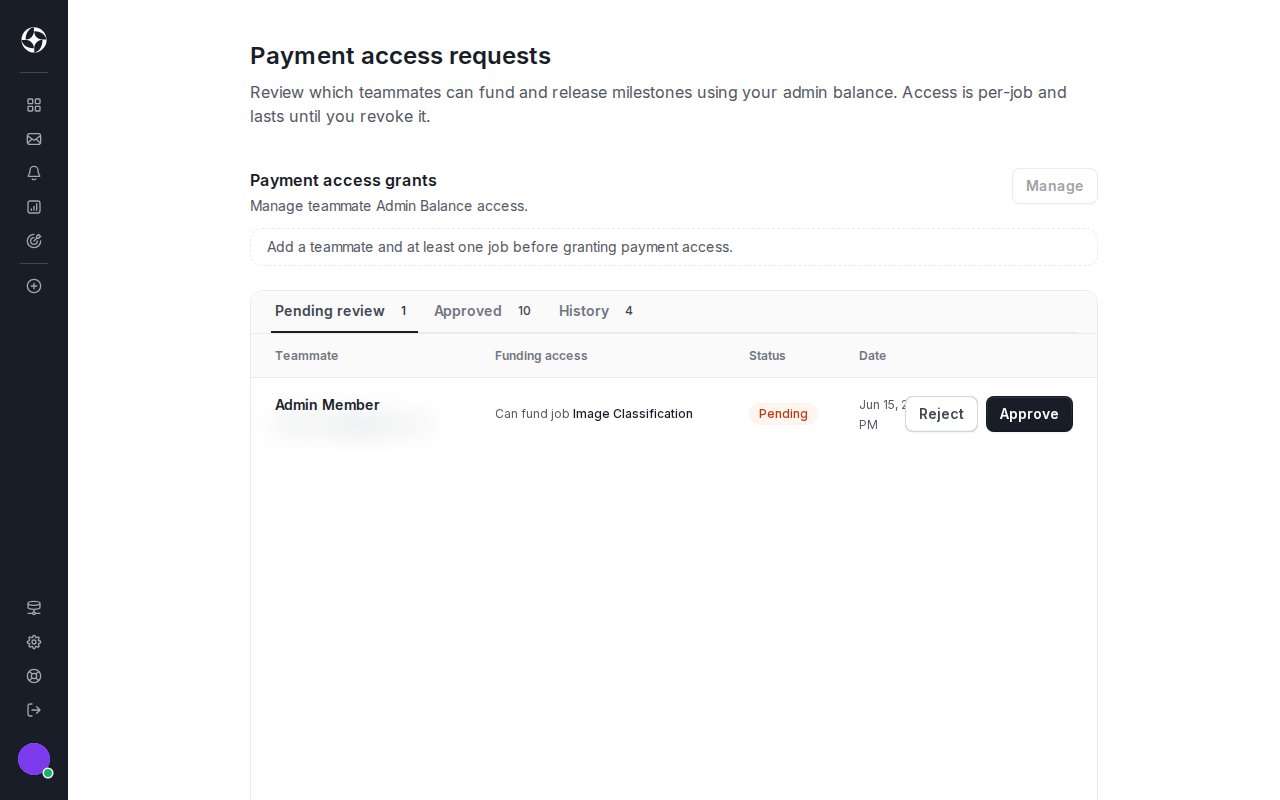
Owners review organization balance access on the **Payment access requests** page in the employer dashboard. There are two entry points, and both land on the same page:
* **Employer dashboard:** open **Payment access requests** from the employer dashboard to see every pending and recently decided request.
* **Request email:** when a teammate submits a request, OpenTrain emails the owner. Open the link in that email and sign in, and it takes you to the same **Payment access requests** page.
The decision always happens inside OpenTrain, so the signed-in owner account must own the job or folder named in the request.
 ## Review and decide
Each request shows:
* the teammate requesting access;
* the job or folder scope;
* the requested balance funding or release action;
* the expiry or revocation state where shown.
Approve only when the teammate should be able to complete the scoped balance action. Reject requests that are unclear or no longer needed.
## Revoke or expire access
Organization balance access follows the same job and folder access you manage for teammates, so you revoke it from the surface that controls that access:
* **One job:** open the job and use **Share** in the job header, or open **Job Settings -> Project access** to review and remove the teammate's access.
* **A folder:** open the folder and use **Share** in the folder header. Removing a folder share also removes access to the jobs inside it.
* **Across the organization:** open **Employer Settings -> Team**, select the teammate, and use **Manage access** to change their job and folder assignments, or remove them from the organization entirely.
Expired requests must be recreated before they can be approved. See [Folders and team access](/docs/employers/folders-team-access) for the full team and project access model, and [Billing and payment methods](/docs/employers/billing-payments) for funding milestones and approving completed work.
Do not share card numbers, bank details, passwords, verification codes, or ID documents in messages or email. Contact [support@opentrain.ai](mailto:support@opentrain.ai) if an organization balance access request looks suspicious.
## Review and decide
Each request shows:
* the teammate requesting access;
* the job or folder scope;
* the requested balance funding or release action;
* the expiry or revocation state where shown.
Approve only when the teammate should be able to complete the scoped balance action. Reject requests that are unclear or no longer needed.
## Revoke or expire access
Organization balance access follows the same job and folder access you manage for teammates, so you revoke it from the surface that controls that access:
* **One job:** open the job and use **Share** in the job header, or open **Job Settings -> Project access** to review and remove the teammate's access.
* **A folder:** open the folder and use **Share** in the folder header. Removing a folder share also removes access to the jobs inside it.
* **Across the organization:** open **Employer Settings -> Team**, select the teammate, and use **Manage access** to change their job and folder assignments, or remove them from the organization entirely.
Expired requests must be recreated before they can be approved. See [Folders and team access](/docs/employers/folders-team-access) for the full team and project access model, and [Billing and payment methods](/docs/employers/billing-payments) for funding milestones and approving completed work.
Do not share card numbers, bank details, passwords, verification codes, or ID documents in messages or email. Contact [support@opentrain.ai](mailto:support@opentrain.ai) if an organization balance access request looks suspicious.